How to Sell Ebooks on Amazon
How to sell ebooks on Amazon with KDP: how royalties work, pricing, categories, keywords, reviews, KDP Select, ads and what to expect. Checked October 2026.
 By Philip Ghezelbash
You sell ebooks on Amazon by publishing them through Kindle Direct Publishing (KDP), which is free to join. Amazon keeps a share of each sale and pays you the rest, either 70 percent or 35 percent of your list price depending on the option you pick. Getting the book live is the easy part. Selling it comes down to a good cover and description, the right categories and keywords, a sensible price, honest reviews, and a plan to bring readers to the page.
This guide is about the selling side. For the account, tax interview and upload steps, read our step-by-step KDP publishing guide. We checked Amazon’s KDP help pages in October 2026, and we say where a page was unclear or a source was not Amazon.
What “selling on Amazon” means for an ebook
The route is KDP. You create a KDP account, upload your book, and Amazon lists it in the Kindle Store. Amazon also runs Seller Central, a separate program for selling products. We did not find any step in KDP’s setup that involves it, and a Seller Central forum answer describes the two as completely different programs, so you do not need it for ebooks.
Once the book is live, readers find and buy it in the Kindle Store, on Amazon’s website and in the Kindle app.
How you get paid
KDP gives you two royalty options for an ebook.
| 35% option | 70% option | |
|---|---|---|
| What you earn | 35% of list price (VAT not counted) | 70% of list price after the delivery fee is taken off (VAT not counted) |
| Price range on Amazon.com | $0.99 to $200 (the minimum depends on file size) | $2.99 to $12.99 |
| Delivery fee | None | $0.15 per MB in the US, based on file size |
| Where it applies | Worldwide | Eligible countries only, 35% elsewhere |
Some points that catch people out:
- The 70% price range was widened on July 7, 2026. It used to stop at $9.99 and now runs from $2.99 to $12.99 on Amazon.com. The Authors Guild said authors with books priced between $9.99 and $12.99 may need to switch to the 70% plan by hand, so check your existing books.
- The 70% rate depends on where the reader is, not where you live. In Brazil, Japan, Mexico and India, it only applies to books enrolled in KDP Select.
- There is a pricing rule against print. For the 70% rate, your ebook list price must be at least 20 percent below the Amazon list price of any print edition of the same book.
- Amazon may match a lower price elsewhere. If it does, your royalty is worked out on the lower price, and if that drops below the 70% minimum you earn 35 percent.
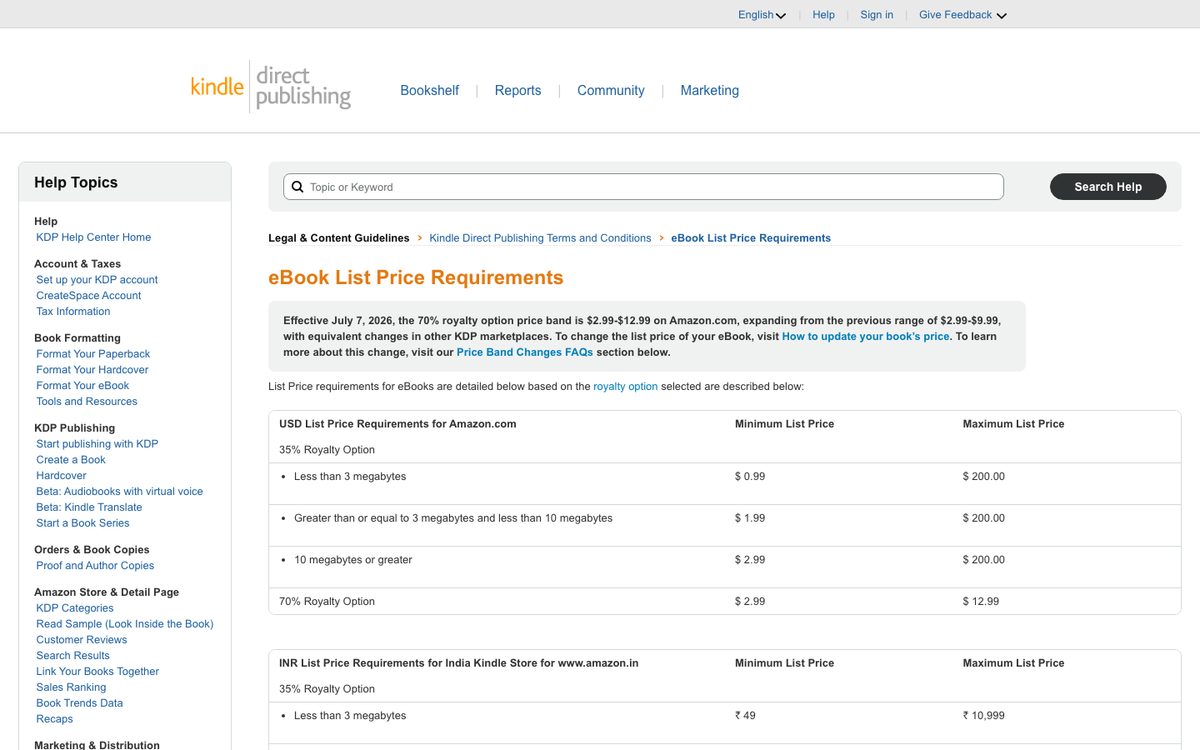
Here is a simple example. You price an ebook at $4.99 and the file is 2 MB. Your royalty on a US sale is 0.70 x ($4.99 minus a $0.30 delivery fee), which is 0.70 x $4.69, or about $3.28. This ignores value-added tax, which applies in some countries. Our free KDP royalty calculator does the math for different prices and file sizes.
KDP Reports shows your orders, pages read and estimated royalties, and the Prior Month’s Royalties report is updated near the 15th of each month. KDP pays 60 days after the end of the month in which your earnings reach the payment threshold. Electronic transfers have no minimum, and checks and wires start at $100 on Amazon.com.
Set a price that sells
There is no single right price. A short lead-magnet ebook and a 60,000-word guide sit in different places, and readers compare your price with the other books on the page. A few practical rules:
- Stay inside the 70% range unless you have a reason to be outside it.
- Look at the top results in your category, then price near books like yours.
- Decide whether the book is meant to earn or to bring readers to something else, such as a course or a service. Our guides on making money from ebooks and how long an ebook should be cover the sales math and length expectations.
You can change the price later, but plan around the 30-day price rules if you want to run a Countdown Deal.
Make your book page do the selling
Readers decide in seconds. These are the parts of the page you control.
Cover. It must read at thumbnail size. Our ebook cover design guide has the rules, and the ebook cover size guide lists the sizes. You can also make one with the AI ebook cover generator.
Title and subtitle. KDP says the title and subtitle together must stay under 200 characters, and keywords that mislead readers are not allowed.
Description. You get 4,000 characters, and the HTML tags count toward that limit. KDP allows basic tags such as paragraph, line break, bold, italic, underline, lists and headings from h4 to h6. It does not allow contact details or website links, reviews, quotes or testimonials, review requests, pricing, time-sensitive information, spoilers, emoji or keywords. Our book description generator gives you a first draft.
Categories. You pick three when you set up the book. KDP may change or remove categories that do not match the book, and category changes can take up to 72 hours. One third-party guide says the old route for requesting extra categories ended in May 2023, so plan around three. Our KDP category finder helps you choose.
Keywords. You get seven keyword boxes. KDP’s page does not give a character limit, but Reedsy’s KDP guide says 50 characters each. Do not put other authors’ names, claims such as “bestselling” or “free”, or unrelated terms in them. Amazon says relevant keywords can help your placement in search alongside sales history and Best Sellers Rank. KDP’s search help adds past sales, availability, how long the book has been listed and popularity, and says it cannot promise a spot near the top. The KDP keyword generator gives you ideas.
Look Inside. Amazon creates the sample automatically, and for ebooks it is 10 percent of the book. You cannot change that, so put your best opening early in the text.
A+ Content. Once a book is published or on pre-order, you can add extra images and text in the A+ Content Manager in the KDP Marketing tab. It appears in the “From the Publisher” section, and KDP says it goes live within 8 business days.
Author Central. This gives you an author page and bio, lets readers follow you for new-release notices, and shows your sales rank and reviews. You reach it from the KDP Marketing tab.
Pre-orders
For a new ebook, you can set a pre-order up to 18 months ahead, if you create it on or after September 2, 2026. Before that date it was 12 months, and KDP’s Terms and Conditions still say 365 days. You can have up to 10 active pre-orders.
The final file is due at least 72 hours before the release date. KDP gives a one-time courtesy if you miss it, and a second miss means you cannot use pre-orders for six months. If you lower the price, readers who already pre-ordered get the lower price.
Reviews: what Amazon allows
Reviews help readers trust a new book, and Amazon is strict about how you get them. KDP’s help says manipulating its programs can lead to account termination and lost royalties, and book descriptions cannot ask for reviews. Amazon’s own community guidelines pages were blocked when we checked, so the first two points below come from third-party guides that quote them:
- You cannot review your own book.
- Reviews from friends and family are not allowed.
- KDP’s help says you may give readers free or discounted copies of your book, as long as you do not require a review or try to influence it. Offering anything else, such as gift cards, gets the review removed.
Asking real readers for an honest review is fine. Our guide on how to get book reviews covers ways to do it that keep you inside the rules.
KDP Select: is it worth it?
KDP Select is a free 90-day program for ebooks. You give Amazon exclusive digital rights to the book, and in return it joins Kindle Unlimited (KU) and you can run promotions. It renews every 90 days unless you turn it off.
| What you get | What you give up |
|---|---|
| Your book is in Kindle Unlimited, where readers borrow it. You are paid for each page read. | You cannot sell or give away the digital version anywhere else for 90 days, including your own website. |
| Up to 5 free days per 90-day term, or one Countdown Deal, not both. | Print, audiobook and other formats can still be sold elsewhere. |
| In Brazil, Japan, Mexico and India, the 70% royalty requires Select. | Amazon can end enrollment at any time. |
How Kindle Unlimited pays. Amazon pays by Kindle Edition Normalized Pages (KENP) read, counted the first time a reader reads each page, up to 3,000 pages per reader per title. Your share is your pages read divided by all pages read, multiplied by a monthly fund. Amazon said the August 2026 KDP Select Global Fund was $66 million, and authors earned $69.4 million from Kindle Unlimited in total once its All Stars bonuses were added. Amazon does not state a per-page rate, and Written Word Media tracked 2026 rates between about $0.0042 and $0.0052 per page, roughly half a cent. At that rate, a 200-page read through earns about 85 cents to $1. These figures change every month.
Promotions.
- A free promotion can run up to 5 days per 90-day term, in one block or split. You earn no royalties while it is free.
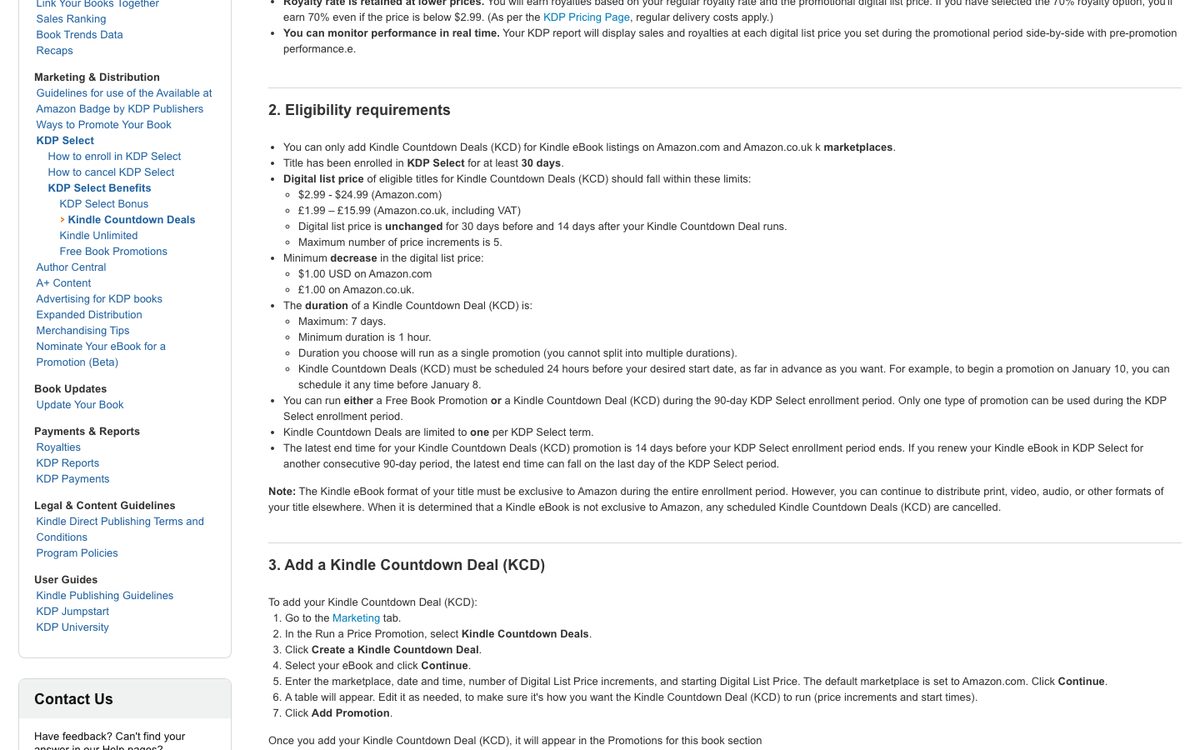
- A Countdown Deal works on Amazon.com and Amazon.co.uk only. The list price must be between $2.99 and $24.99 (or £1.99 to £15.99), the book needs 30 days in Select first, and your list price must stay unchanged for 30 days before and 14 days after. The deal can last from one hour to seven days.
How to decide. There is no clear winner in the data. In Written Word Media’s mid-year 2026 survey of 582 authors, among those whose business was growing and who felt upbeat about it, 46 percent were exclusive to KDP Select and 47 percent were wide. The sample is self-selected, so treat it as a sign that both routes work.
Select tends to fit you if:
- Amazon is where almost all of your readers find you.
- You are new and want Kindle Unlimited readers and promotions to help the first sales.
- You do not need the digital file anywhere else.
It tends to fit less if:
- You sell the ebook from your own site, on Shopify or Gumroad, or as a lead magnet. Exclusivity covers those too.
- You want to be on Apple Books, Kobo or Google Play. See our guides for Apple Books, Kobo and Google Play Books.
One third-party guide says a 10 percent sample of the book may be shared outside Amazon. Amazon’s own pages do not say that, so ask KDP support before you rely on it.
How to leave. In your Bookshelf, open the three-dot menu, choose Manage KDP Select, then Manage KDP Select Enrollment, and untick “Automatically renew this book’s enrollment.” The book stays enrolled until the current term ends. You can only cancel outright within three days of a term starting, and after that you have to contact KDP, so plan on the full 90 days. If you are weighing a wider release, our self-publishing guide compares going direct with using an aggregator.
Amazon Ads
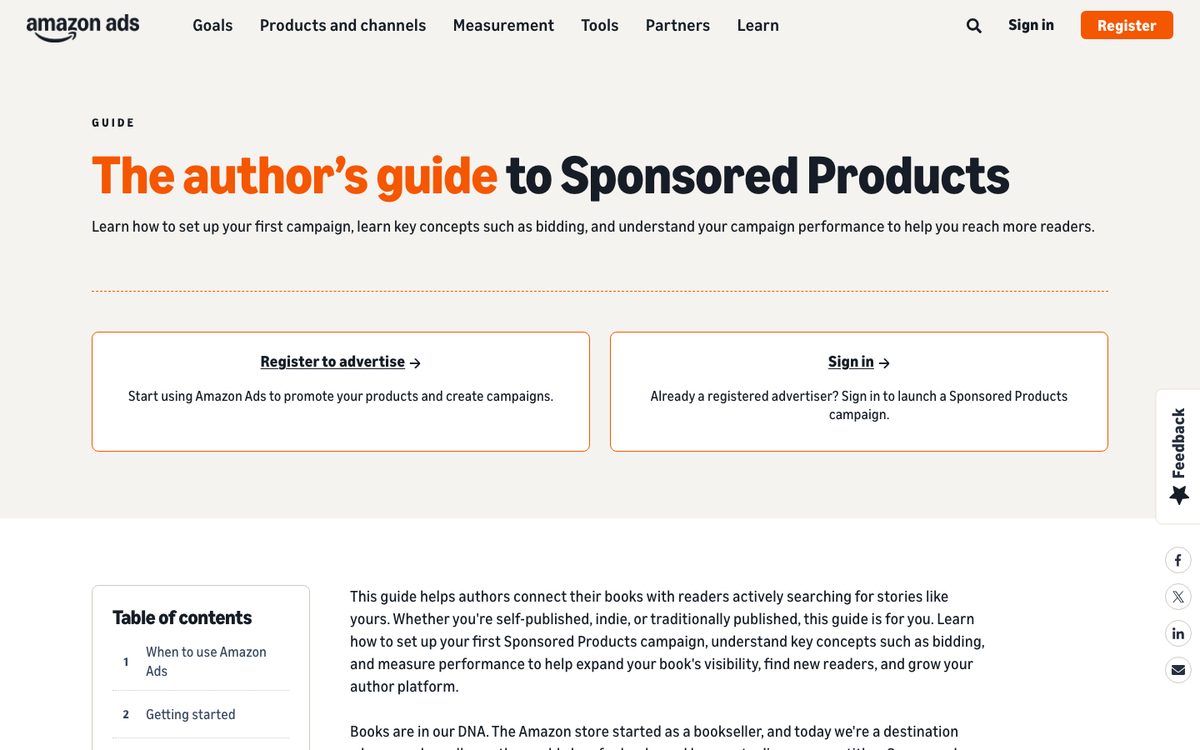
Amazon offers two ad types for books. Sponsored Products charge per click and show on Amazon, Kindle and Goodreads. Sponsored Brands needs three or more eligible titles and allows video. You start both from the KDP Marketing tab, and Sponsored Brands also needs three or more of your titles claimed under one author name in Author Central, and they run in a list of countries that includes the US, UK, Canada, Germany and Australia.
You set your own budget. Amazon Ads’ budget guide recommends at least $10 a day per campaign so ads keep running all day, and a guest post on the Amazon Ads blog suggests a starting bid of about $0.39. Both are advice, not rules. Work out your royalty per sale first. If ads cost more than a sale earns, the book will lose money on every click that does not convert.
Bring readers to your page
Most ebooks do not sell by being listed. A few things that help:
- Build an email list. Written Word Media’s 2025 survey found authors with email lists reported around $300 a month versus $15 for those without. That is a correlation, not proof, but a list gives you readers you do not have to rent from a store. A free chapter or lead magnet is a common way to start one.
- Send traffic yourself. Our guide on how to promote an ebook covers channels, and a simple landing page gives you somewhere to send people.
- Write a series or a follow-up. Readers who like one book often look for the next.
Disclose AI the right way
If you use AI to write your book, KDP requires you to say so when you publish. It asks you to disclose AI-generated text, images and translations. AI-assisted editing does not need to be disclosed. KDP also removes books that give readers a poor experience or have misleading descriptions. Our guide on publishing an AI-written book on Amazon explains the line between the two.
Track what is happening
The KDP Reports dashboard shows orders, pages read and estimated royalties, plus your top formats and marketplaces. Check it weekly in the first month and change one thing at a time, such as the cover, the description or the price, so you know what moved the result. Our Amazon book sales calculator gives a rough estimate of sales from a Best Sellers Rank, but it is only an estimate.
What to expect
Most self-published ebooks earn modest amounts. The Authors Guild’s 2023 survey (2022 income) reported a median of $12,800 in book income for full-time self-published authors. For all authors in the survey, full and part time, the median book income was $2,000. Written Word Media’s 2025 survey found 44 percent of respondents earned $100 a month or less and 13 percent earned more than $5,000. These surveys mostly include fiction authors and self-selected respondents, so they may not match nonfiction books or books made with AI.
Quick checklist
| Before you publish | On the book page | After launch |
|---|---|---|
| Cover works at thumbnail size | Description under 4,000 characters, no banned items | Check reports weekly |
| Price inside the 70% range | Three categories and seven keywords | Ask real readers for honest reviews |
| Decide on KDP Select | Add A+ Content and set up Author Central | Change one thing at a time |
| AI disclosure answered correctly | Look Inside opening is strong | Build an email list |
FAQ
Do I need an Amazon seller account to sell ebooks?
No. You publish ebooks through a KDP account. Seller Central is a separate program for selling products, and KDP’s setup does not use it.
How much does Amazon take from an ebook sale?
With the 70% option, Amazon takes off a delivery fee based on file size and pays you 70 percent of what is left. With the 35% option, it keeps 65 percent and there is no delivery fee.
Can I sell an ebook on Amazon for free?
Yes, publishing is free, and Amazon takes its share when the book sells. You cannot set a $0 price. The lowest list price is $0.99, and a book can only be free for readers through KDP Select free days or when Amazon matches a free price elsewhere.
How long until my ebook is on sale?
Amazon says a new ebook’s page appears within 72 hours, though its help also says up to 3 business days. Updates to book details also take up to 72 hours, and the Look Inside sample takes 7 to 8 business days.
Do I need an ISBN?
Not for a Kindle ebook, because Amazon gives it its own identifier. See our guide on whether an ebook needs an ISBN.
Can I sell the same ebook on my own website?
Yes, unless it is enrolled in KDP Select, which requires exclusive digital rights for 90 days. Without Select, you can sell it elsewhere. See where to sell ebooks.
Can I sell an AI-generated ebook on Amazon?
Yes, if you disclose it when you publish and the book gives readers a good experience. Amazon’s quality and description rules still apply.
Is KDP Select worth it for a first ebook?
It can help if Amazon is your only store and you want Kindle Unlimited readers and promotions. It costs you the ability to sell the digital book anywhere else. Some authors try it for one term and decide from their own results.
Where Koobe fits
Koobe handles the making part: describe your book in a sentence, edit the outline, and Koobe writes the chapters, designs four covers, and exports an EPUB, a PDF, a print interior PDF and a cover image. Koobe drafts chapters with AI, so under KDP’s definition a book published from that draft counts as AI-generated, and you answer the disclosure question that way. Your first book is free to create and preview, and plans start at $23 a month billed yearly.
Describe your book in a sentence. Koobe plans the chapters, writes them, designs the cover and exports a PDF and EPUB. Your first book is free.

“Files were ready for KDP, which is what I actually needed. First book I’ve finished.”