The 7 Best Ebook Formats for Publishing in 2026
Use reflowable EPUB for most ebooks. See when PDF, KPF, DOCX or fixed layout is the better choice, and which formats each major store accepts.
 By Philip Ghezelbash
For most authors the best ebook format is reflowable EPUB, which Amazon KDP, Apple Books, Kobo, Google Play Books and Draft2Digital all accept. The other six formats below each fit one situation, so this guide says when to use each one and when to skip it.
The 7 formats at a glance
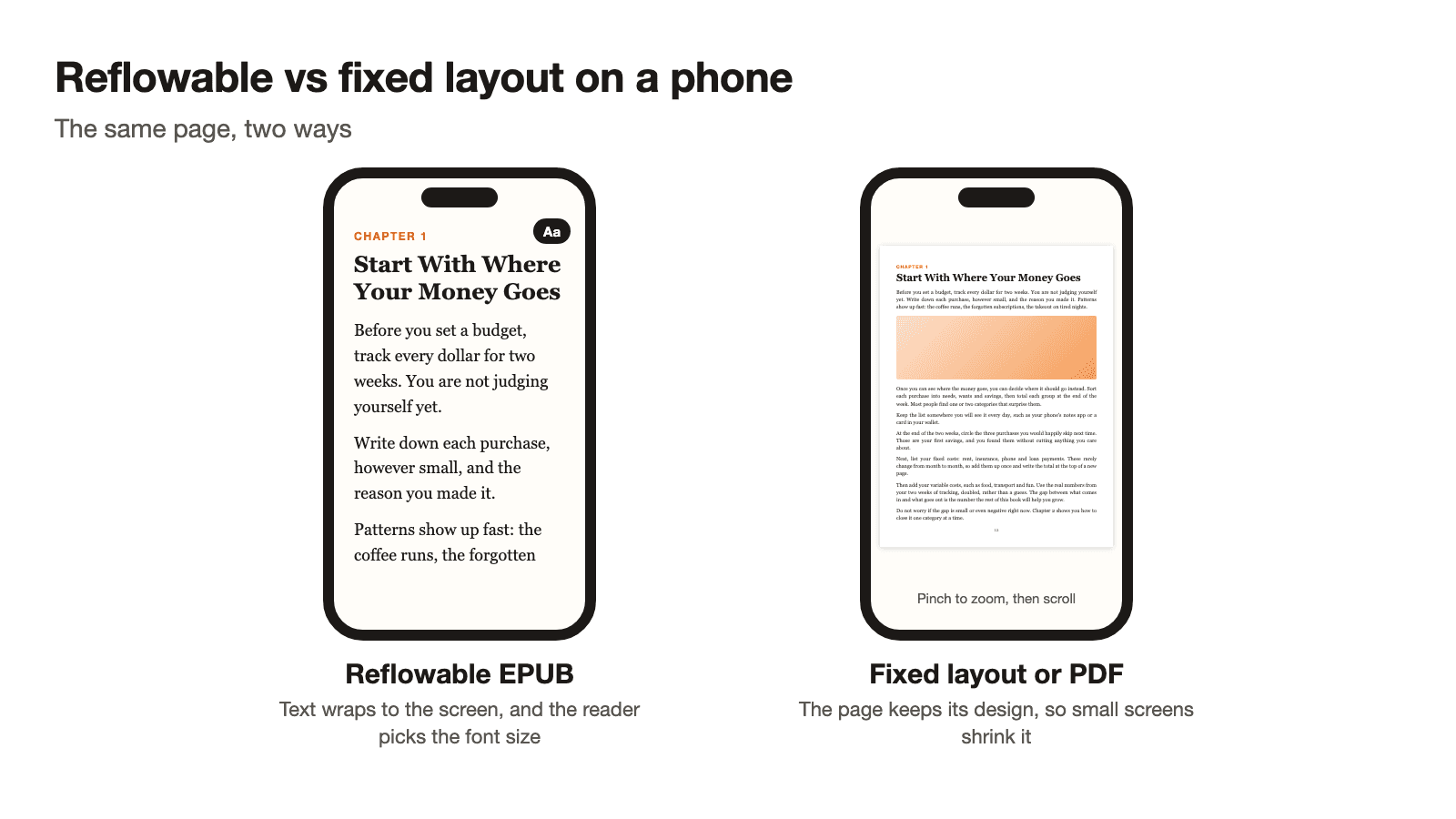
Five of these formats are current and two are older. Reflowable means the text adapts to the screen and the reader can change the font size. Fixed means every page keeps the layout you designed.
| # | Format | Layout | Best for | Status |
|---|---|---|---|---|
| 1 | EPUB (reflowable) | Reflowable | Text-first nonfiction sold in any store | Current, the default choice |
| 2 | Fixed-layout EPUB | Fixed | Picture books, comics, design-heavy books | Current, special cases |
| 3 | KPF | Reflowable or print replica | Amazon-only books made in Kindle Create | Current, Amazon only |
| 4 | DOCX | Converted to reflowable | Authors who write in Word and let stores convert | Current, quality varies |
| 5 | Fixed | Lead magnets, workbooks, direct sales | Current, limited store support | |
| 6 | MOBI | Reflowable | Old files only | Older, KDP stopped accepting it |
| 7 | AZW3 | Reflowable | What Kindles read after conversion | Older, not an upload format |
1. EPUB (reflowable): the default choice
EPUB is the open standard for ebooks. The W3C's EPUB 3.3 specification describes it as a ZIP file that packages HTML, CSS, SVG and other resources, and says publications by default "are intended to reflow to fit the available screen space." That is why one file reads well on a phone, a tablet and an e-reader.
Every major store takes it:
- Amazon KDP supports EPUB files that meet its publishing guidelines and recommends checking them with Kindle Previewer.
- Apple Books asks for an EPUB, and all books must pass the latest EPUBCheck. Its current asset guide covers EPUB 3 only.
- Google Play Books accepts EPUB 3.3, EPUB 3 and EPUB 2, and prefers 3.3.
- Kobo and Draft2Digital accept EPUB too.
Use it for text-first nonfiction such as guides, how-tos, business books and memoirs. Skip it as your only format if the book depends on exact page layouts.
Check every EPUB before you upload. Our free EPUB checker finds errors that stores reject.
2. Fixed-layout EPUB: for books where the page design matters
A fixed-layout EPUB keeps every page as you designed it. Apple defines it as an EPUB that "uses fixed positioning to retain book design and formatting." The W3C notes that fixed layout is optional and uses "pixel-precise fixed layouts using images and/or CSS positioning."
It suits books where the layout is part of the content: children's picture books, comics and graphic novels, magazines, and cookbooks with full-page photos. KDP says comic ebooks should be created and uploaded in a fixed-layout format, and Google notes that EPUB 2 and EPUB 3 both support fixed layout and advises reviewing the file in its Web Reader before it goes live.
The trade-off is reading comfort. Amazon's MOBI FAQ describes fixed-layout ebooks as having a fixed page size, typically with image backgrounds, where the size of the text cannot be adjusted. On a small screen that means zooming and scrolling. Most nonfiction does not need this. If your book is mainly text with a few images, stay with reflowable EPUB.
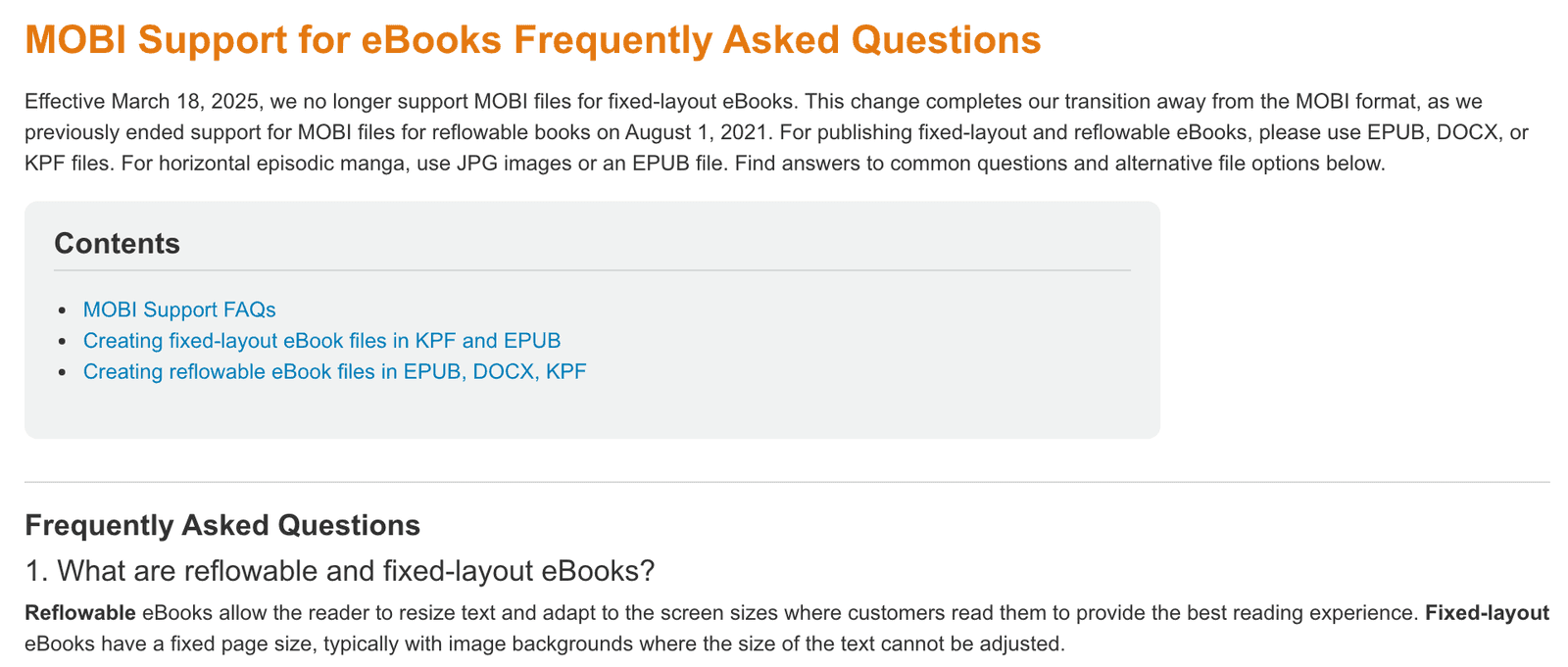
On Amazon, KDP's FAQ says to use EPUB, DOCX or KPF for both fixed-layout and reflowable ebooks.
3. KPF: for Amazon-only books made in Kindle Create
KPF stands for Kindle Package Format. It is the file that Amazon's Kindle Create app produces. KDP's Print Replica help page says Kindle Create produces a "publishable file (KPF) that you can submit to KDP," and that the KPF is only used for publishing, while the project file is what you keep for future edits. Kindle Create runs on Windows and Mac.
KDP lists KPF among its recommended formats, saying it "allows your eBook to easily format and fit all Kindle devices." Its formatting guide also recommends Kindle Create for elements like drop caps. Kindle Create has a Print Replica mode that turns a PDF into an ebook that keeps the print layout, but readers cannot resize the text in those books.
Use KPF if you sell only on Amazon and want Kindle polish. The catch is that a KPF is for KDP. For Apple Books, Kobo or Google Play Books you still need an EPUB, so a book sold in several stores starts from EPUB instead.
See our Amazon KDP publishing guide for the upload steps.
4. DOCX: the easy start if you write in Word
DOCX is a Word file, and it is the one format most authors already have. Three channels take it and convert it to an ebook for you:
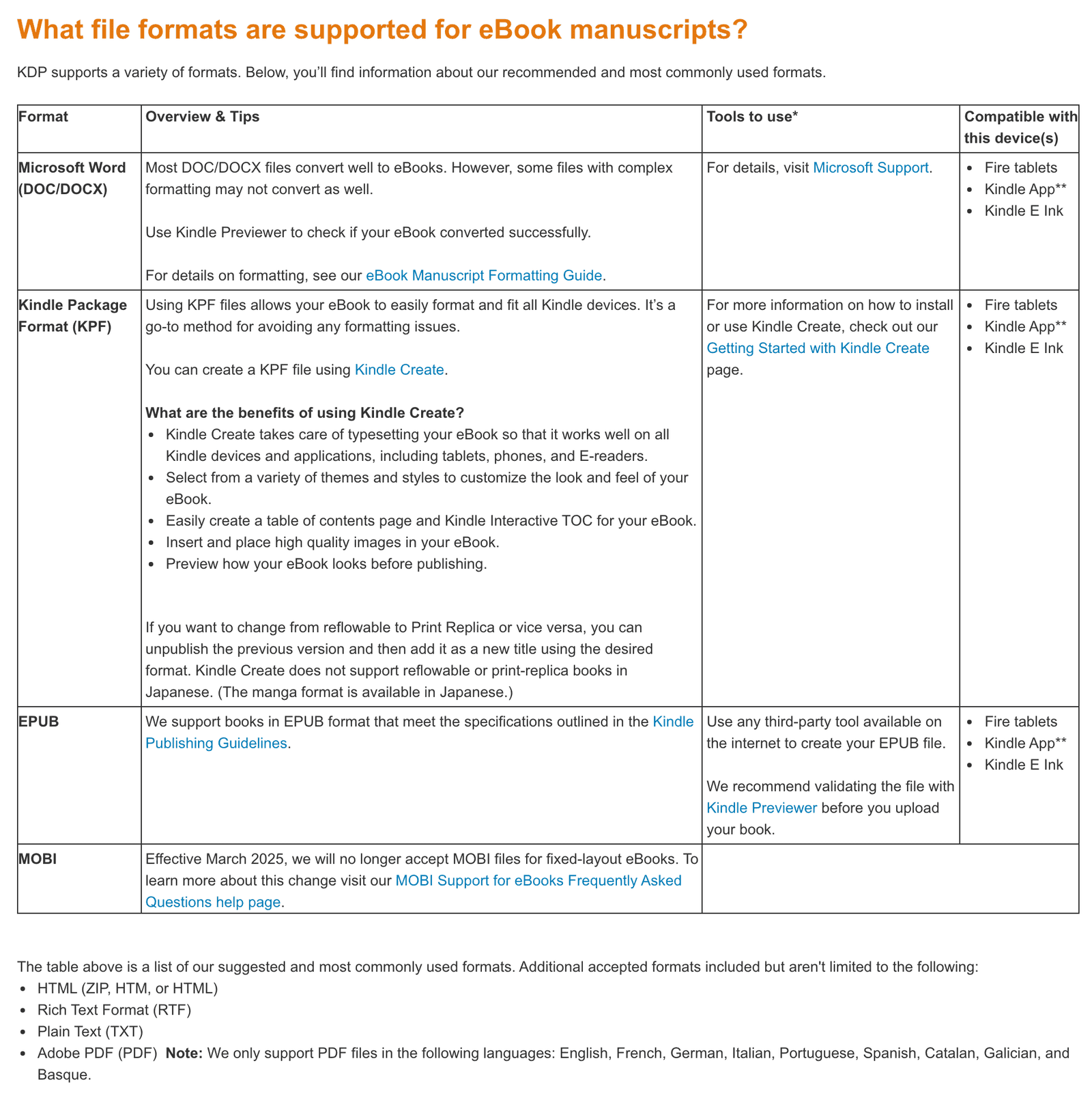
- Amazon KDP recommends DOC and DOCX. KDP says "Most DOC/DOCX files convert well to eBooks," but files with complex formatting may convert less well.
- Kobo Writing Life accepts .doc and .docx and converts them to a Kobo ePub.
- Draft2Digital says to upload your book as .doc or .docx and it converts the manuscript.
Apple Books wants an EPUB, and Google Play Books does not accept .doc files, so a Word file alone will not cover those two stores.
Word files convert best when they are simple. KDP's formatting guide says tab spacing does not convert to Kindle, so use the first-line indent setting, and that ebooks are reflowable, so page numbers, headers and footers are not needed. Our guide to formatting an ebook has the full rules, and the Word to EPUB converter makes the EPUB for the other stores.
5. PDF: best for lead magnets, workbooks and direct sales
PDF keeps every page exactly as designed, on any device. That makes it the right format for workbooks, worksheets, checklists, design-heavy guides and free lead magnets. It opens on almost any device.
Its weakness is reading on a phone, where readers have to zoom and scroll, and store support is limited:
- Google Play Books accepts EPUB or PDF and recommends sending both. A PDF must contain the whole book and cannot be password protected.
- Amazon KDP lists PDF as an additional accepted format, only in nine languages: English, French, German, Italian, Portuguese, Spanish, Catalan, Galician and Basque. Our PDF vs EPUB guide explains why PDFs often convert badly.
- Apple Books asks for an EPUB. Draft2Digital does not accept PDF for ebooks, only as a print interior.
If you sell a PDF yourself, for example on your own site, remember that KDP Select is a 90-day program that requires your ebook to be exclusive to the Kindle Store while it is enrolled, so you cannot sell the same ebook on your site during that time.
PDF is also the format for a lead magnet. See how to create a lead magnet ebook, and the PDF to EPUB converter if you later want store versions.
6. MOBI: an older format KDP no longer accepts
MOBI is a format from the Mobipocket era that Amazon's Kindle files were built on. You will still meet old MOBI files, but you should not start a new book in it.
KDP's MOBI FAQ gives two dates. KDP ended MOBI support for reflowable books on August 1, 2021. It stopped accepting MOBI uploads for fixed-layout ebooks on March 18, 2025, saying "we no longer accept MOBI files." For both kinds it says to use EPUB, DOCX or KPF. Titles you already published do not need changes unless you update them.
Elsewhere, Kobo's new ebook setup page still lists MOBI among the formats it accepts and converts. Amazon's own Send to Kindle also moved on: Vellum reported in 2022 that Send to Kindle by email began accepting EPUB in place of MOBI.
If you hold an old MOBI file, re-export the book from its source as an EPUB. Our EPUB checker will test the result.
7. AZW3: the Kindle format you read but do not upload
AZW3 is also called Kindle Format 8 (KF8). Wikipedia's Kindle file format entry says it was introduced in late 2011 with the Kindle Fire, supports a subset of HTML5 and CSS3, and is used by fourth generation and later Kindles. A newer format, KFX, added better typesetting on later devices.
You do not upload AZW3 to KDP. It is not on KDP's list of upload formats, which names EPUB, DOCX, KPF and a few others. Where you will see it is on the Kindle itself. The same Wikipedia entry notes that in 2022 Amazon announced that EPUB files sent to a Kindle would be converted to AZW3, and Vellum's 2022 report says the same.
So AZW3 matters only when you send a proof copy to your Kindle with Send to Kindle, or open an old file. For publishing, start from an EPUB and let the store handle the Kindle version.
Which format each store accepts
EPUB is the one format every store here takes. Check the store's own page before you upload, because rules change.
| Store | Accepts | Notes |
|---|---|---|
| Amazon KDP | EPUB, DOC and DOCX, KPF (recommended); also HTML, RTF, TXT and PDF in some languages | MOBI no longer accepted |
| Apple Books | EPUB | Must pass EPUBCheck |
| Kobo Writing Life | EPUB, DOC, DOCX, ODT, MOBI | Non-EPUB files are converted; 100 MB limit |
| Google Play Books | EPUB, PDF | Recommends sending both; no .doc or .html |
| Draft2Digital | Word (.doc, .docx), ODT, RTF, EPUB | EPUB accepted for ebooks, not print |
Both Apple Books and Google Play Books require EPUBs to pass EPUBCheck, so test yours first. Step-by-step upload guides: Amazon KDP, Apple Books, Kobo and Google Play Books.
How to choose your format
Pick by where the book will be read and sold.
| Your situation | Best format |
|---|---|
| Text-first nonfiction sold in several stores | Reflowable EPUB |
| Sold only on Amazon, and you want Kindle polish | KPF from Kindle Create, or EPUB |
| You write in Word and start with Amazon, Kobo or Draft2Digital | DOCX, then an EPUB for Apple Books and Google Play Books |
| Picture book, comic or cookbook with full-page photos | Fixed-layout EPUB, checked against each store's rules |
| Free lead magnet, workbook or worksheet | |
| A download sold from your own site | PDF, plus EPUB for readers who use e-readers |
| An old MOBI file | Re-export as EPUB |
If you are unsure, make a reflowable EPUB first. You can always add a PDF later, but an EPUB is the file every store accepts. For the head-to-head comparison, read PDF vs EPUB.
How to check and convert your file
- Convert from your source. Use the Word to EPUB converter, DOCX to EPUB, Markdown to EPUB or PDF to EPUB. A PDF has fixed pages, so expect to tidy the result.
- Validate the EPUB. Apple Books and Google Play Books both require EPUBs to pass EPUBCheck. Run the EPUB checker and fix every error.
- Fix small problems. The EPUB editor lets you adjust a file without starting over.
- Preview before you upload. For Amazon, KDP recommends checking with Kindle Previewer.
- Check the cover. Each store has size rules, listed in our ebook cover size guide.
For formatting rules that work in every store, see how to format an ebook.
FAQ
What is the best ebook format?
Reflowable EPUB for most books. Every store in this guide accepts it, and the text adapts to any screen. Use PDF for lead magnets and workbooks.
What is the best ebook format for Kindle?
KDP recommends EPUB, DOCX or KPF. Choose EPUB if you also sell in other stores. Choose KPF if you sell only on Amazon and want to use Kindle Create. MOBI is no longer accepted.
What is the difference between reflowable and fixed layout?
KDP says reflowable content "reflows when an eBook's text settings are changed." Fixed layout keeps each page as designed, which suits picture books, comics and design-heavy books.
Does Kindle still use MOBI?
Not for new uploads. KDP ended MOBI support for reflowable books on August 1, 2021, and stopped accepting MOBI for fixed-layout ebooks on March 18, 2025.
Is PDF a good ebook format?
It is good for workbooks, worksheets and lead magnets because pages look the same everywhere. It is a poor choice for long reading on a phone, and most stores prefer EPUB.
What is the best ebook format for Apple Books?
EPUB. Apple Books asks for an EPUB file, and it must pass EPUBCheck.
What is the best format for selling ebooks on my own site?
PDF is the simplest because buyers can open it anywhere. Offer an EPUB as well for readers who use e-readers or reading apps. See where to sell ebooks.
Where Koobe fits
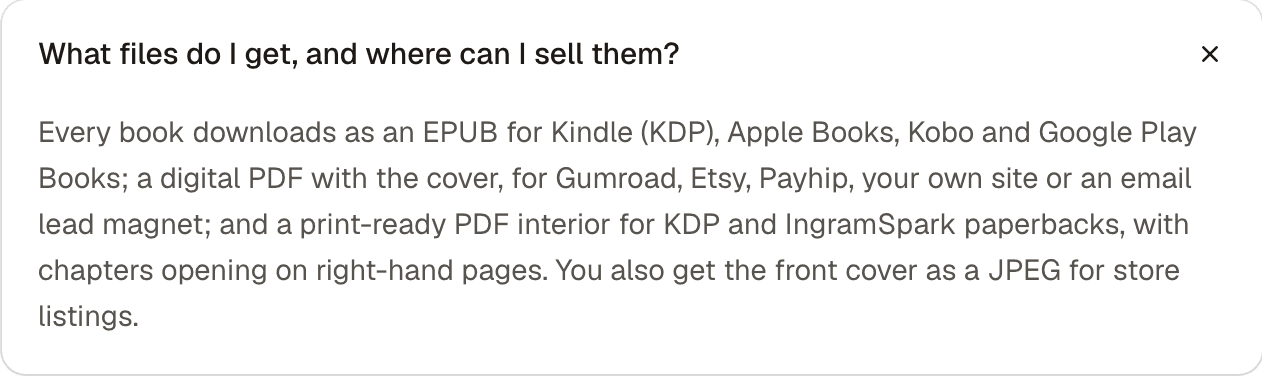
Koobe exports the formats most authors need: an EPUB 3 for the stores, a digital PDF with the cover, a print interior PDF for paperbacks, and cover images sized for store listings and for Kindle. You describe your book in a sentence, review the draft and export. Your first book is free to create and preview.
Koobe does not export DOCX and does not publish to stores for you, so you upload the files to each store yourself. Our formatting guide covers that last step.
Describe your book in a sentence. Koobe plans the chapters, writes them, designs the cover and exports a PDF and EPUB. Your first book is free to create and preview.

“Files were ready for KDP, which is what I actually needed. First book I’ve finished.”