How to Sell Ebooks on Gumroad
How to sell ebooks on Gumroad: create the product, upload PDF and EPUB, set a price and get paid. Fees, taxes, payouts and mistakes. Checked October 2026.
 By Philip Ghezelbash
You sell an ebook on Gumroad by creating an account, choosing New product, picking E-book, uploading your PDF and EPUB, setting a price and publishing. Gumroad has no monthly fee. It takes 10 percent plus 50 cents of each sale you send to it yourself, plus card processing, and 30 percent of sales that come through its Discover marketplace. Gumroad also handles sales tax and VAT for you as the merchant of record.
This guide covers the full setup, the fees with a worked example, how payouts work, how to protect your file, and the mistakes Gumroad’s own help warns about. We checked Gumroad’s pricing page, help pages and terms in October 2026. Gumroad’s help text only loaded in a full browser for us, and two older ebook and pre-order help articles that Google still lists now redirect to the help index, so we did not use them.
Is Gumroad a good place to sell ebooks?
Gumroad is a simple way to sell a digital file to people you already reach, such as an email list or an audience on social media. You do not need a website, and a new product can be live in a few minutes.
It is less useful if you expect to be found by strangers. You bring your own traffic, apart from Discover, which has eligibility rules and a high fee. Payouts are held for new sellers, and Gumroad’s rules on what you can sell are strict. If you want your own branded store, see our guide to selling ebooks on Shopify. If you want a marketplace with built-in shoppers, see Etsy or Amazon, and our where to sell ebooks roundup compares them all.
Gumroad fees
| Sale type | Gumroad’s fee | Notes |
|---|---|---|
| Direct sale (your profile or product link) | 10% + $0.50 per transaction | Gumroad’s help says card processing (2.9% + $0.30) or PayPal fees are separate |
| Discover sale (found in Gumroad’s marketplace) | Flat 30% | Includes processing fees |
| Direct sales after $20,000 in a calendar month | 5% + $0.50 for new sales that month | Resets each month and applies automatically |
| Monthly fee | None |
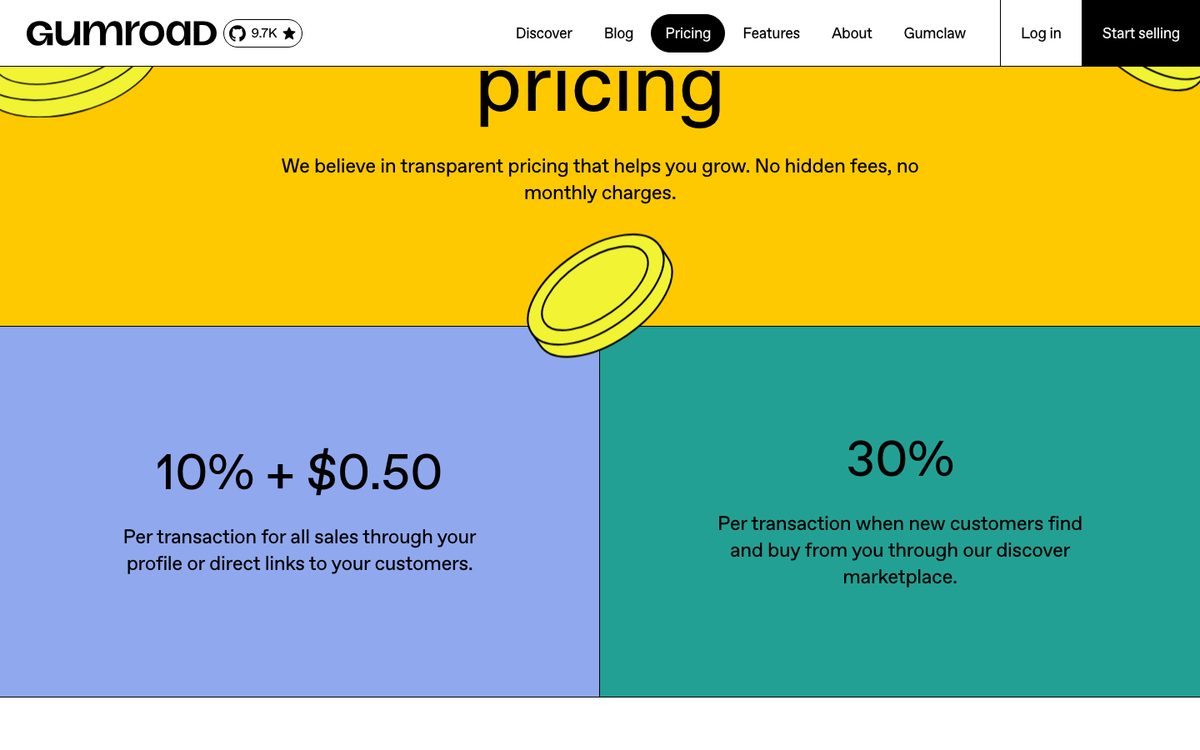
Gumroad’s pricing page does not mention processing fees, which makes the fee look all-in. Its help page on fees and a December 2024 Gumroad post both say card processing is extra on direct sales. Check the breakdown on your first sale to confirm.
Example for a $15 ebook:
- Direct sale: Gumroad takes $1.50 plus $0.50, which is $2.00. Card processing at 2.9 percent plus $0.30 is about $0.74. You keep about $12.26.
- Discover sale: Gumroad takes 30 percent, which is $4.50, and you keep $10.50.
If a buyer pays sales tax or VAT, it is added on top of the price and is not part of your cut. If you refund an order, Gumroad returns its own fee on the refunded amount, and only the payment processor’s part is kept.
Taxes
Since January 1, 2025, Gumroad has been the merchant of record. That means it collects and sends in sales tax and VAT in the regions where it has tax obligations, so you do not file them yourself for those sales. For digital products, VAT is collected at checkout wherever it applies. In the EU and UK, sellers cannot turn VAT off or make prices tax-inclusive.
The product editor has a switch called “Mark product as e-publication for VAT purposes”, which can apply reduced EU rates for ebooks and reduces UK VAT to 0 percent. Gumroad says to ask a tax accountant if you are unsure. You still owe income tax on your earnings in your own country.
What you need before you start
- A PDF and ideally an EPUB. Gumroad recommends uploading EPUB as well as PDF. For PDFs, it suggests a 6 by 9 inch page size with a 12 point font. Our PDF vs EPUB guide explains which format suits whom.
- A cover image. PNG, JPEG, MOV or GIF, or a YouTube or Vimeo link. Gumroad recommends 1280 by 720 pixels, allows up to 8 covers, and image covers must be under 50 MB. A PDF cannot be used as a cover.
- A thumbnail at least 600 by 600 pixels. It shows in your Library, Discover and your profile.
- A description and a price.
- Payout details: a bank account in a supported country or a PayPal account. Bank payouts also need a government photo ID and proof of residence or a registered business. US sellers also need a Social Security number.
Step by step: sell an ebook on Gumroad
1. Create your account and payout details
Sign up, then fill in your payout settings. Make sure the name and address match your ID, and do not use a PO box. Gumroad’s help says documents that do not match your payout settings will keep being rejected, which holds up your payouts.
2. Create the product
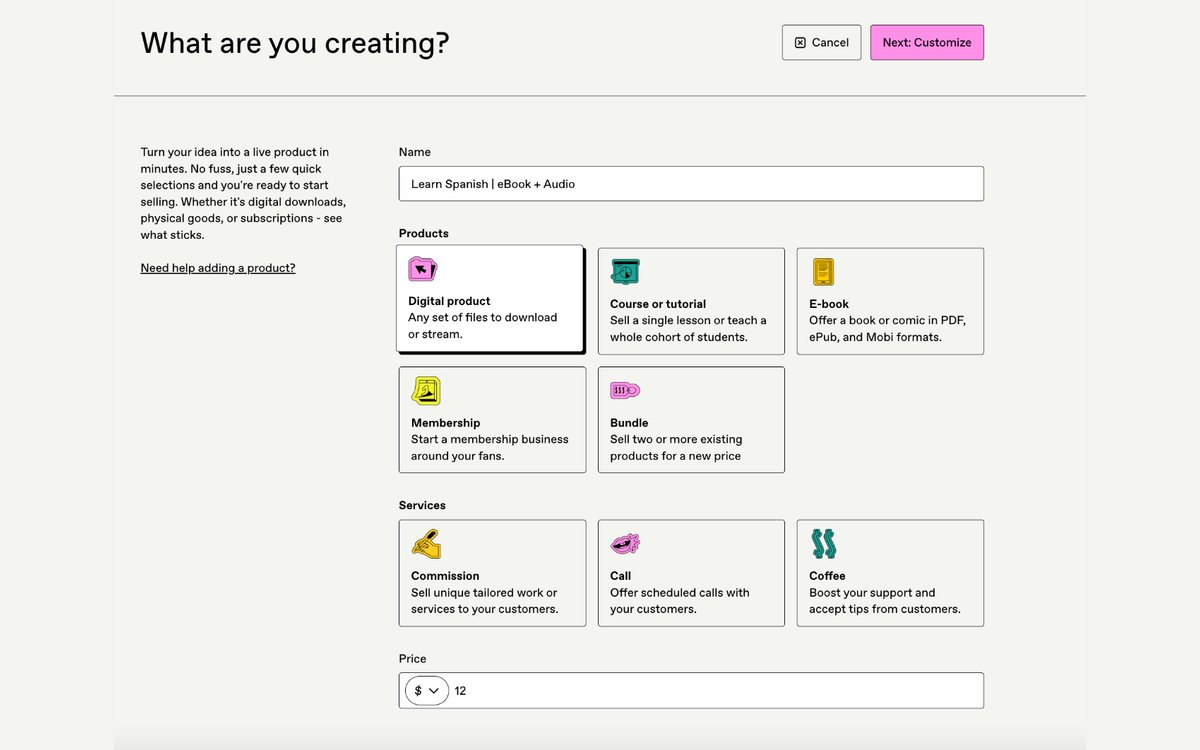
Go to the Products dashboard and choose New product, then pick E-book. You can also choose Digital product, Course, Membership, Bundle or Service.
3. Name it and set the price
Add a clear name, and set a price anywhere from free up to $5,000. To let buyers pay what they want, add a plus sign to the minimum price, for example “$5+”.
4. Write the description
The editor lets you style text and add images, quotes and video. Say who the ebook is for, what they will learn or get, and what is inside. Our guide to ebook landing pages shows what works.
5. Add the cover and thumbnail
Upload your cover, and a separate thumbnail if you want one. Avoid special characters such as # $ _ + & ; : % in the cover file name, which Gumroad’s help warns can cause trouble.
6. Upload your files
Open the Content tab and add your files. Paid products can have files up to 20 GB each. Free and pay-what-you-want products that start at $0 are capped at 250 MB in total. You can sell PDF and EPUB as versions of the same product, and Gumroad’s features page says buyers can choose their format.
7. Choose how buyers read it
Buyers get a Read button in their Gumroad Library for PDF and EPUB files, and the reader saves their place. EPUB readers can change text size and switch between light, sepia and dark themes. EPUB files over 32 MB are download-only.
Buyers can also send PDF and EPUB files up to 16 MB to a Kindle from their Library or the download page. The buyer approves Gumroad’s sending address in their Amazon account first. You can hide the Send to Kindle and Read buttons for each file in the content editor. Buyers do not need a Gumroad account to buy, and the receipt email contains the download link.
8. Protect the file
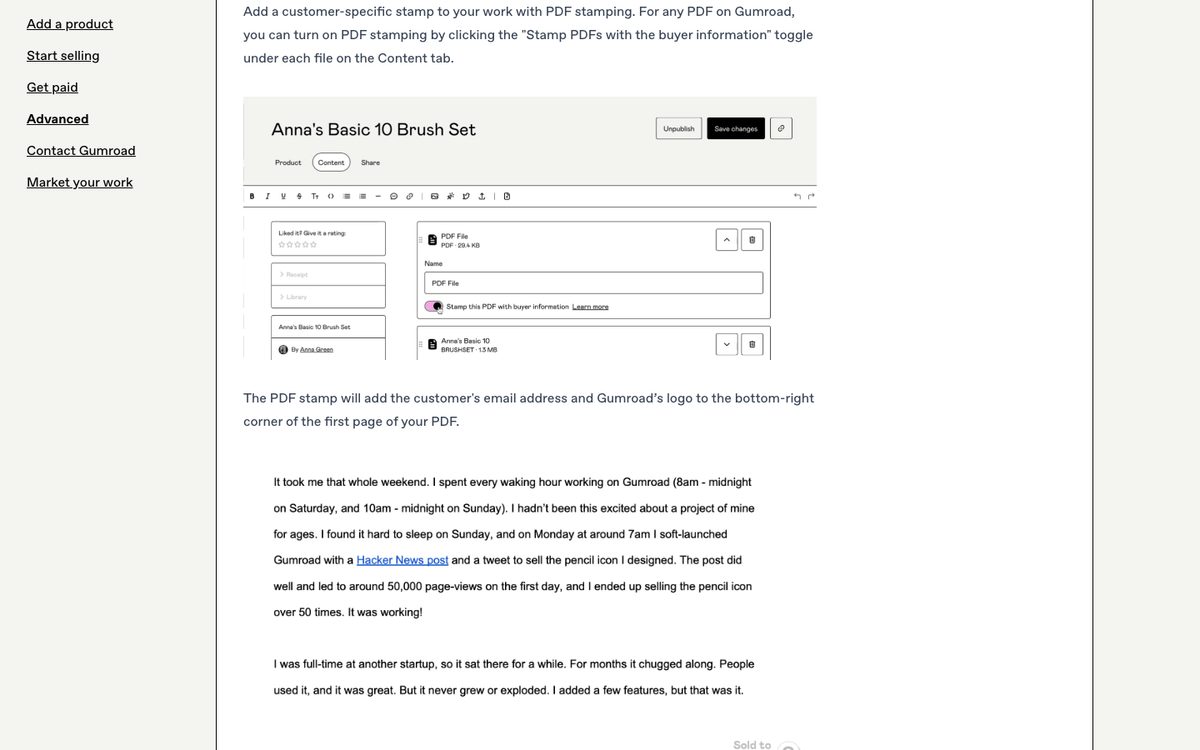
Under each PDF in the Content tab, you can turn on “Stamp PDFs with the buyer information.” Gumroad adds the buyer’s email and its logo to the bottom right of the first page. This is applied when the receipt email is sent. It does not work with password-protected PDFs, and Gumroad says it is not DRM. Stamping discourages sharing, but it does not stop it.
Do not use license keys for ebooks. Gumroad says they are meant for software and will not limit access to ebook files. We found no official download-limit setting for ebooks.
9. Set a refund policy
In the product settings, you can set your own refund policy, such as a 30-day guarantee or no refunds. If more than 1 percent of your customers dispute charges, Gumroad enforces a refund policy on your whole account, and a no-refunds policy becomes a 30-day money-back guarantee. Gumroad’s terms say a refund rate above 15 percent can lead to a 25 percent reserve for 90 days, and above 25 percent can lead to suspension.
10. Run a test purchase and publish
Use Gumroad’s test purchase feature, not a real purchase of your own product. Gumroad’s help says payment processors treat buying your own product as fraud, and it can get your account suspended or banned. Then click Publish. Your product gets a link, and you can customize the end of it. You can also connect your own domain with a CNAME record, though buyers still download from a Gumroad link.
Get paid
- Minimum payout: $100. Some countries have a higher minimum in local currency.
- Schedule: weekly, monthly or quarterly, and daily for eligible US accounts. Payouts cover sales through the previous Friday (UTC), and weekly, monthly and quarterly payouts have a 7-day hold on each sale.
- Methods: bank deposits in local currency in more than 100 countries, including New Zealand and South Korea, taking 2 to 7 business days. PayPal is used where banks are not supported, paid in US dollars in 1 to 3 business days with a 2 percent fee.
- Not supported: Payoneer, Wise, checks and wires.
- New accounts: payouts are skipped until the account passes a risk review, which takes 1 to 3 weeks and typically needs 3 to 4 sales and a $100 balance.
Gumroad’s terms say it can change the payout schedule at its discretion, so check its help pages before relying on dates. If you change your payout country, you can lose any unpaid balance on the old account.
Sales tools
Gumroad documents these tools:
- Discount codes with usage limits, expiry dates and auto-apply.
- Bundles and upsells, such as an add-on or a replacement product.
- Affiliates, where you set a rate for your own affiliates, or let anyone promote your product through Gumroad Affiliates at a fixed 10 percent.
- Email, followers and workflows, though you cannot send emails or workflows until you have earned $100 after fees and received a payout.
- Analytics, ratings and reviews, and Purchasing Power Parity pricing.
Discover is Gumroad’s marketplace. To be eligible, you need your payout settings filled in, a $100 balance from real sales, a passed risk review, at least one sale, a category selected and ratings turned on. Products on Discover are automatically opted in to Gumroad Affiliates.
Get your first sales
Gumroad does not send much traffic to a new product. The usual routes are:
- Your email list. A free chapter or lead magnet that leads to the paid ebook works well.
- Links from your website, newsletter, social profiles or videos.
- A buy button or embed on your own site, which Gumroad’s help covers.
- A launch with a discount code for your first audience.
Our guides on how to promote an ebook and how to get book reviews cover more ideas.
What you can and cannot sell
We found no Gumroad rule that bans ebooks written with AI. Its terms and prohibited products list have no AI-content section. Its AI rule is about selling access to AI tools or chatbots fulfilled outside Gumroad, which is different from selling a book. These rules matter for ebook sellers:
- Reselling private label rights (PLR or MRR) products and reselling ebooks you do not own is not allowed.
- Unauthorized copies of books are not allowed.
- Essay and paper mills, sexually explicit content, “get rich quick” and investment-opportunity services, credit repair ebooks, hacking material and multi-level marketing are not allowed.
- A product with no content attached that tells buyers to message you elsewhere is blocked at publish.
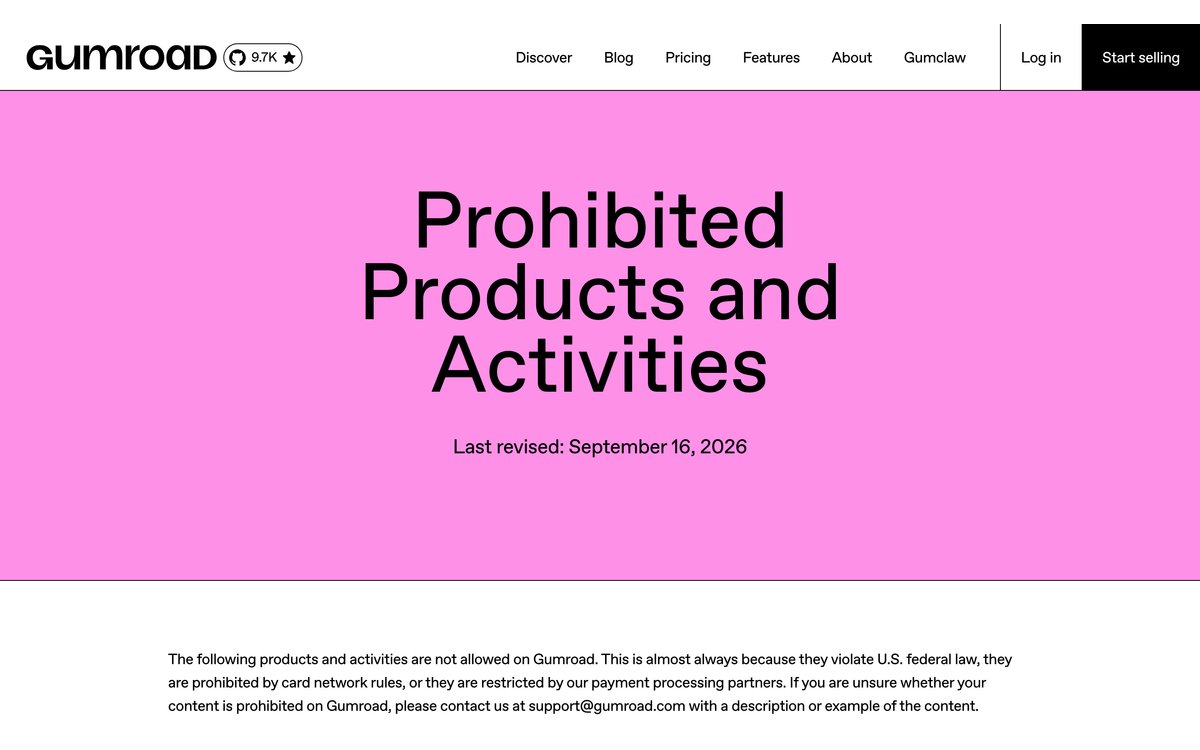
Do not republish someone else’s text, and do not sell done-for-you ebooks that buyers can resell. Gumroad updated its prohibited products page on September 16, 2026, so read it before you publish.
If you also sell on Amazon
Gumroad counts as selling elsewhere, so an ebook that is in KDP Select cannot also be sold on Gumroad. See our guide to selling ebooks on Amazon.
Mistakes to avoid
Gumroad’s own help warns about these:
- Buying your own product to speed up review.
- A payout name or address that does not match your ID.
- Using a PO box address.
- Changing your payout country and losing the old balance.
- Password-protecting a PDF you want stamped.
- Choosing no refunds with a high chargeback rate.
- Skipping a test purchase.
- Starting email marketing before you have earned $100 and had a first payout.
- Using a PDF as the product cover.
FAQ
Is Gumroad free to use?
There is no monthly fee. Gumroad takes 10 percent plus 50 cents on direct sales, plus card processing, and 30 percent on Discover sales.
How much does Gumroad take from an ebook sale?
On a $15 direct sale, Gumroad’s fee is $2.00. Card processing is about $0.74 on top, according to Gumroad’s help, so you keep about $12.26. On a Discover sale, you keep $10.50.
Do I have to handle sales tax or VAT?
For sales where Gumroad collects tax, no. It is the merchant of record and collects and sends in sales tax and VAT. You still owe income tax in your own country.
What file types can I upload?
Gumroad’s help names PDF and EPUB for reading, Send to Kindle and its mobile app. Its features page also mentions MOBI. We did not find an official list of every file type, so test any other type.
Can buyers read the ebook on a Kindle?
Yes, for PDF and EPUB files up to 16 MB, using Send to Kindle from the Library or download page. They need to approve Gumroad’s sending address in their Amazon account first.
How long until I get my first payout?
New accounts go through a risk review that usually takes 1 to 3 weeks, and payouts need a $100 balance. After that, payouts follow your schedule, and each sale waits at least 7 days.
Can I sell an AI-written ebook on Gumroad?
We found no rule against it. Follow the prohibited products list, and do not claim you wrote something you did not. If you also sell on Amazon, KDP asks you to disclose AI-generated text, images or translations when you publish.
Do buyers need a Gumroad account?
No. They get a download link in their receipt email. A Library is available if they sign up with the same email.
Gumroad or KDP for ebooks?
KDP brings Amazon’s shoppers and pays 70 percent on prices from $2.99 to $12.99 on Amazon.com, but you give up control of the customer and the file. Gumroad keeps more of your control and customer data, and you bring the traffic. Many authors use both, unless the ebook is in KDP Select.
Where Koobe fits
Koobe makes the ebook you would sell. Describe your book in a sentence, edit the outline, and Koobe writes the chapters, designs four covers and exports a PDF, an EPUB, a print interior PDF and a cover image, ready to upload to Gumroad as PDF and EPUB versions. Your first book is free to create and preview, and plans start at $23 a month billed yearly.
Describe your book in a sentence. Koobe plans the chapters, writes them, designs the cover and exports a PDF and EPUB. Your first book is free.

“Files were ready for KDP, which is what I actually needed. First book I’ve finished.”