Free Kindle Ebook Template
A Word manuscript built for Amazon KDP, with clean heading styles and a linked table of contents, so it reflows on any Kindle.
 Word
Word Amazon KindleFree to use for your own ebooks. Please do not resell the template.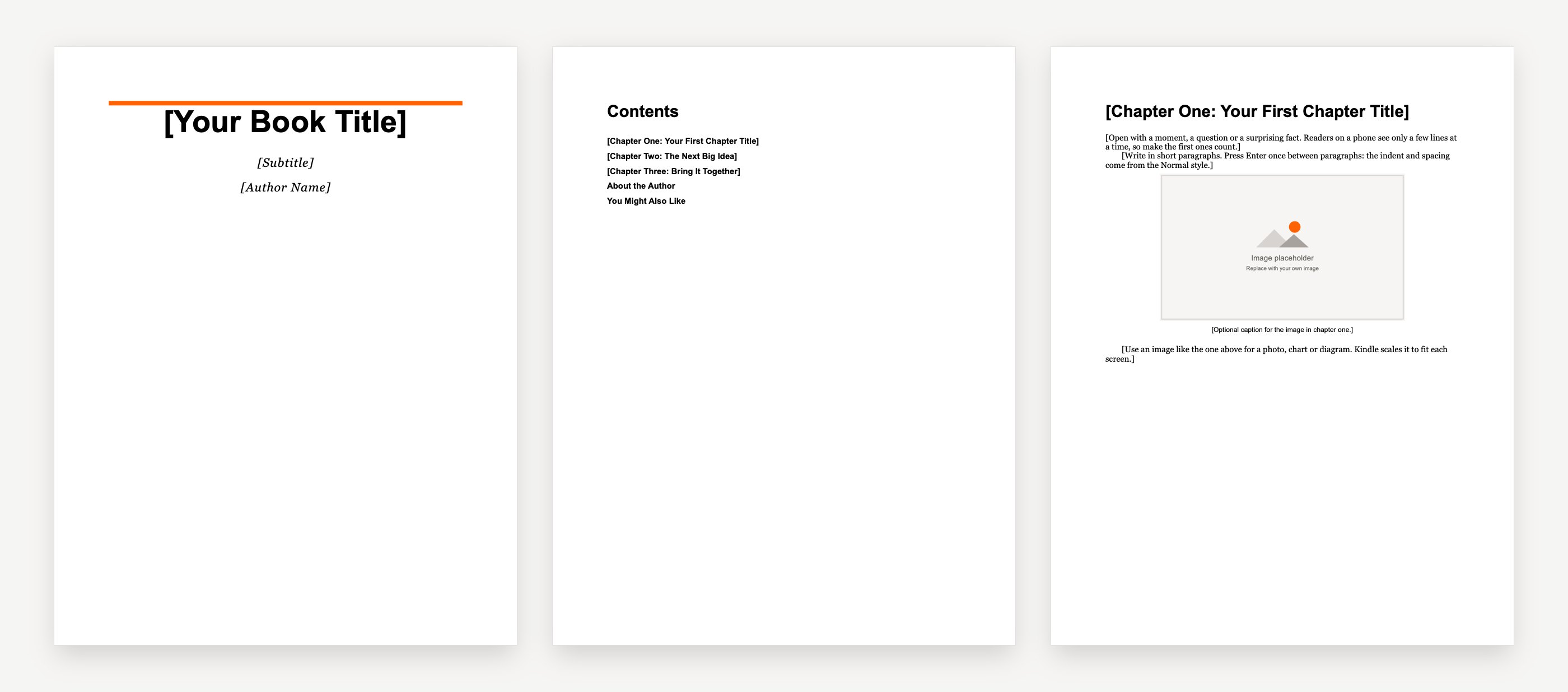


What is inside
- A "How to use this template" page to delete before uploading
- A title page and a copyright page
- A linked table of contents with no page numbers, one level deep, as KDP asks, with the "toc" bookmark KDP describes
- Three sample chapters: each title is a Heading 1 that starts a new page from the style itself
- Body text in the Normal style with the first-line indent set in the style, and default line spacing
- An inline image placeholder with alt text in each chapter
- An about the author page and a "You might also like" page
- No headers, footers, page numbers, tabs or blank lines used for layout
Kindle ebook vs print book
A print book has a fixed page size, such as 6 by 9 inches, with page numbers, headers and set line breaks.
A Kindle ebook is reflowable. Each reader chooses the font and text size, and the text reflows to fit a phone, tablet or Kindle. Page numbers, headers and fixed layouts do not carry over, which is why a fixed trim-size template is the wrong tool for Kindle. Use heading styles and simple formatting, and let the device do the layout.
How to format your ebook for Kindle
- Use built-in styles only. Normal for body text, Heading 1 for chapter titles.
- Start chapters with the style. Set Heading 1 to start on a new page (Modify, Format, Paragraph, Line and Page Breaks, Page break before). Do not add other manual page breaks.
- Indent with the style. Set the first-line indent in the Normal style. Never use tabs or spaces to indent, and do not press Enter to add space.
- Leave out page numbers, headers and footers. They do not apply to a reflowable ebook.
- Keep line spacing at the default. KDP asks for the default line height for body text.
- Insert images inline, not floating, and add alt text to each one.
- Make a linked table of contents. References, Table of Contents, Custom Table of Contents: clear Show Page Numbers and set Show levels to 1. KDP also suggests adding a bookmark named toc to the contents title (Insert, Bookmark).
Sources: KDP, create a table of contents and text guidelines for reflowable books.
Cover size
KDP's ideal Kindle cover is 1,600 pixels wide by 2,560 pixels tall, saved as a JPEG in RGB color. Covers with a white or very light background look best with a thin medium gray border, so their edges show on the white store page. See our ebook cover templates for ready-made covers at this size.
Source: KDP, cover image guidelines.
Upload to KDP
- Sign in to KDP, go to your Bookshelf and create a new Kindle ebook.
- Fill in the details: title, author, description, keywords and categories.
- On the content page, upload your .docx and your cover, then open the previewer and check every chapter.
- Check it more closely in Kindle Previewer, Amazon's free app, if you can.
- Set your price and royalty, then publish. Our guide on how to price an ebook can help.
Kindle Create is Amazon's free alternative: import your Word file, style it in the app and upload the file it makes.
KDP asks you to disclose AI-generated content (text, images or translations) when you publish. See KDP's content guidelines.
Kindle ebook template FAQ
Free to start · No card needed · Cancel anytime
How do I format an ebook for Kindle?
Use Word’s built-in styles, start each chapter with a Heading 1 that begins a new page, set indents in the Normal style instead of using tabs, leave out page numbers, headers and footers, insert images inline with alt text, and add a linked table of contents without page numbers. Then check the file in Kindle Previewer.
What’s the best ebook format for Kindle?
KDP accepts Word (.docx), EPUB and KPF files made with Kindle Create. A clean .docx built on styles, or a well made EPUB, both convert well. Check whichever you use in Kindle Previewer before you publish.
Can I write an ebook with ChatGPT and sell it?
Yes, you can sell an ebook you wrote with AI tools on Amazon KDP, as long as it follows KDP’s content guidelines. KDP asks you to tell it when text, images or translations are AI-generated as you publish. Read KDP’s content guidelines before you publish.
More free ebook templates
Word ebook template
A book-style ebook with the page size, margins and heading styles already set.

Google Docs ebook template
The same book layout for Google Docs. Make a copy and start writing.
Ebook outline template
Plan your reader, your promise and every chapter on one or two pages.
Ebook cover templates
Ten original covers by genre, at the Kindle size of 1,600 by 2,560 pixels.
“Still went out the same week. That’s the part I couldn’t do on my own.”
 Claire Dobson · Freelance designer, Bristol
Your book is one sentence away
Describe it, watch Koobe build it, and download it when you’re happy. Your first book is free to create and preview.
Free to start · No card needed · Cancel anytime