Free Ebook Outline Template
A one to two page plan for your ebook: who it is for, what it promises and what every chapter does.
 Google Docs
 Word
Word PDFFree to use for your own ebooks. Please do not resell the template.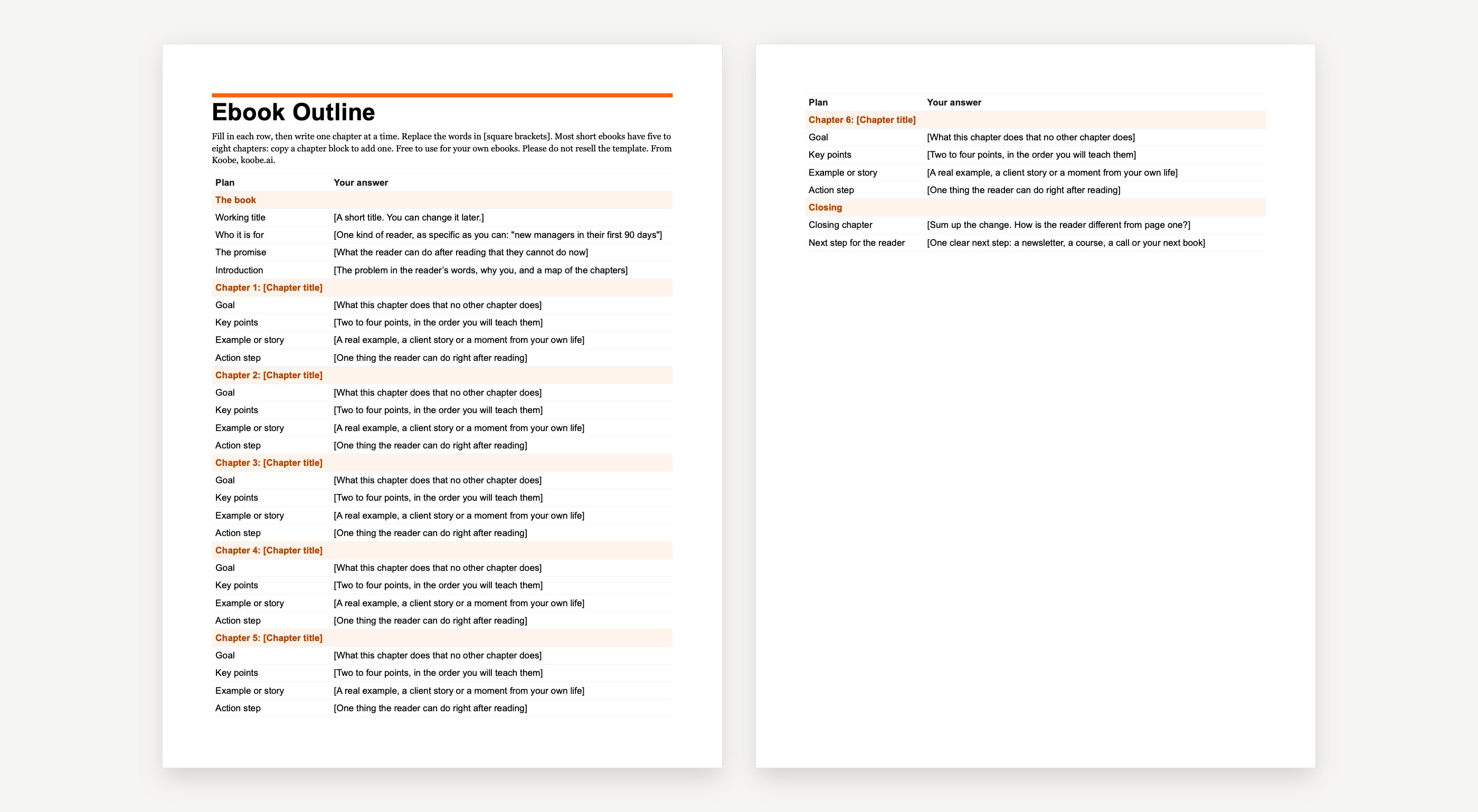


The outline, at a glance
The template is one fill-in table. Copy the chapter block for as many chapters as you need.
How to fill it in
- 1Write who the book is for in one sentence. The narrower, the easier every chapter becomes.
- 2Write the promise: what the reader can do after reading that they cannot do now.
- 3List five to eight chapter titles in the order the reader needs them.
- 4For each chapter, fill in the goal, key points, an example and one action step. Merge any two chapters that share a goal.
- 5Write the closing and the next step, then write one chapter at a time from the plan.
Stuck on the chapters? The free ebook outline generator drafts a chapter plan from your topic.
Example outlines
The 10-Minute Inbox Reset
Reach a clear inbox in 10 minutes and keep it that way with one daily habit.
- 1. Why your inbox fills up
- 2. The 10-minute reset
- 3. The daily habit
Sourdough for Busy Parents
Bake a good sourdough loaf in about ten active minutes a day.
- 1. Why sourdough fits a busy life
- 2. Your starter in seven days
- 3. The 15-minute bake-day schedule
- 4. Shaping without the stress
- 5. Baking with kids in the kitchen
- 6. Fixing flat, dense or sour loaves
Your First Coaching Offer
Finish with a named, priced offer you can share this week.
- 1. Who you help best
- 2. The result you deliver
- 3. Shape the package
- 4. Set the price
- 5. Tell five people
30 Days to a Calmer Budget
Have a simple budget you actually use, in 30 days.
- 1. Days 1 to 7: see where money goes
- 2. Days 8 to 14: set three pots
- 3. Days 15 to 21: cut one leak
- 4. Days 22 to 30: make it automatic
Ebook outline template FAQ
Free to start · No card needed · Cancel anytime
What is the best way to outline an ebook?
Start with the reader and the promise: who it is for and what they can do after reading. Then list five to eight chapters in the order the reader needs them, and give each one a single goal, a few key points, an example and an action step. If two chapters share a goal, merge them.
Where can I find free ebook templates?
Koobe has free outline, Word, Google Docs and Kindle templates and genre cover templates on its templates page. Canva, Adobe Express and Visme also have free ebook layouts you can edit in their own editors.
Can ChatGPT create an ebook?
AI tools can draft an outline and chapters, but you still need to check the facts, add your own experience and format the book. Tools built for ebooks, such as Koobe, also handle the layout, cover and files for you.
More free ebook templates
Word ebook template
A book-style ebook with the page size, margins and heading styles already set.
Google Docs ebook template
The same book layout for Google Docs. Make a copy and start writing.

Kindle ebook template
A reflowable Word manuscript for Amazon KDP, with a linked table of contents.
Ebook cover templates
Ten original covers by genre, at the Kindle size of 1,600 by 2,560 pixels.
“Still went out the same week. That’s the part I couldn’t do on my own.”
 Claire Dobson · Freelance designer, Bristol
Your book is one sentence away
Describe it, watch Koobe build it, and download it when you’re happy. Your first book is free to create and preview.
Free to start · No card needed · Cancel anytime